The brief
I wanted to use one of the round knob displays as a desk companion for Claude Code. The idea was to see what it’s doing without watching the terminal, and to answer its permission requests from the desk.
The solution
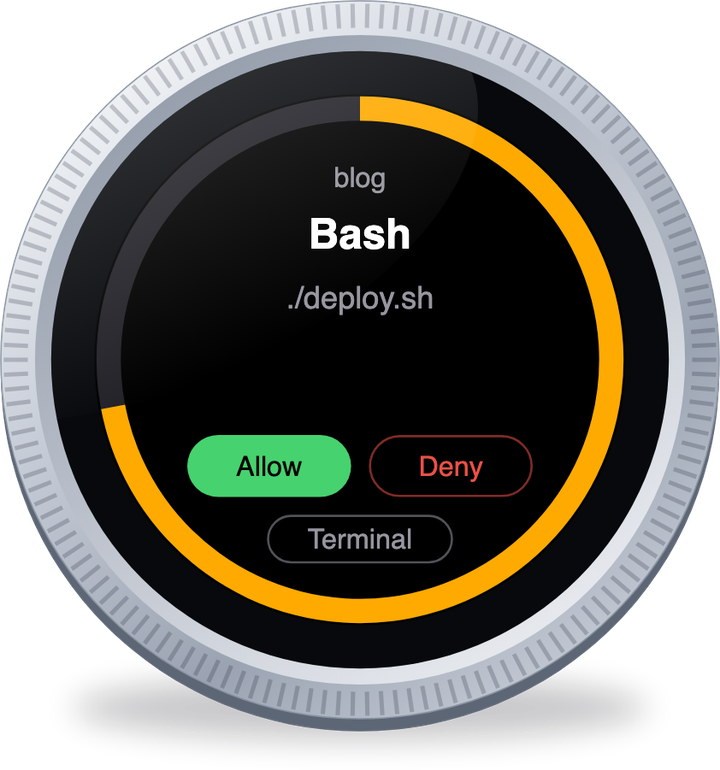
The device sits next to my keyboard and shows whether Claude Code is idle, working, waiting on me or done. When it asks to run something, the request comes up on the screen with the tool and the command. I turn the knob to Allow, Deny or Terminal and press to confirm. If I don’t do anything a countdown runs out and the question goes back to the terminal.
When nothing is running it shows how much of my usage limits I’ve used - one ring for the 5 hour limit and one for the 7 day limit.
There’s a small program on my Mac that listens to Claude Code and talks to the device over USB. I built it with Claude in an evening, which meant it was approving its own requests on the device while we tested it.
What it solves
I don’t have to keep an eye on the terminal, and I can approve things without switching windows. It also ignores presses for the first half second after a request shows up, so I can’t approve something by accident.
What’s next
Right now it only works for one project folder and I have to start the program on the Mac by hand. Next is getting it to start when I log in and work for every project.